
Role: UX/UI designer on Blueboy studio.
Main Goal: Design a web page to register an online company, where the user fills out a number of forms and surveys and the company provides the online notary service.
Target Audience: Entrepreneurs looking for a quick and easy way to register a company online based in Mexico.
Key Challenges: One of the main challenges was to create a friendly and secure application tied to a marketing strategy where the user can learn about the benefi of the product, while starting an inbound marketing flow. I've achieved two objectives, receive information from the user to include in a sales funnel and encourage the user to complete the purchase of the service.
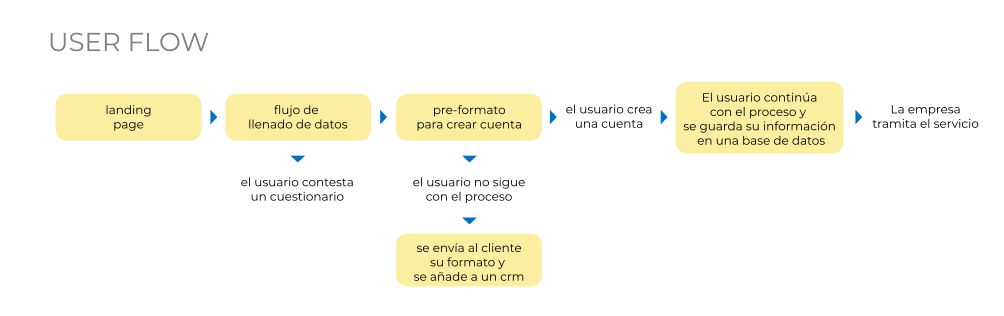
First we define the ideal user flow and then proceed to design the main screens using wireframes in order to generate a low-fidelity prototype and review the usability of the web app.
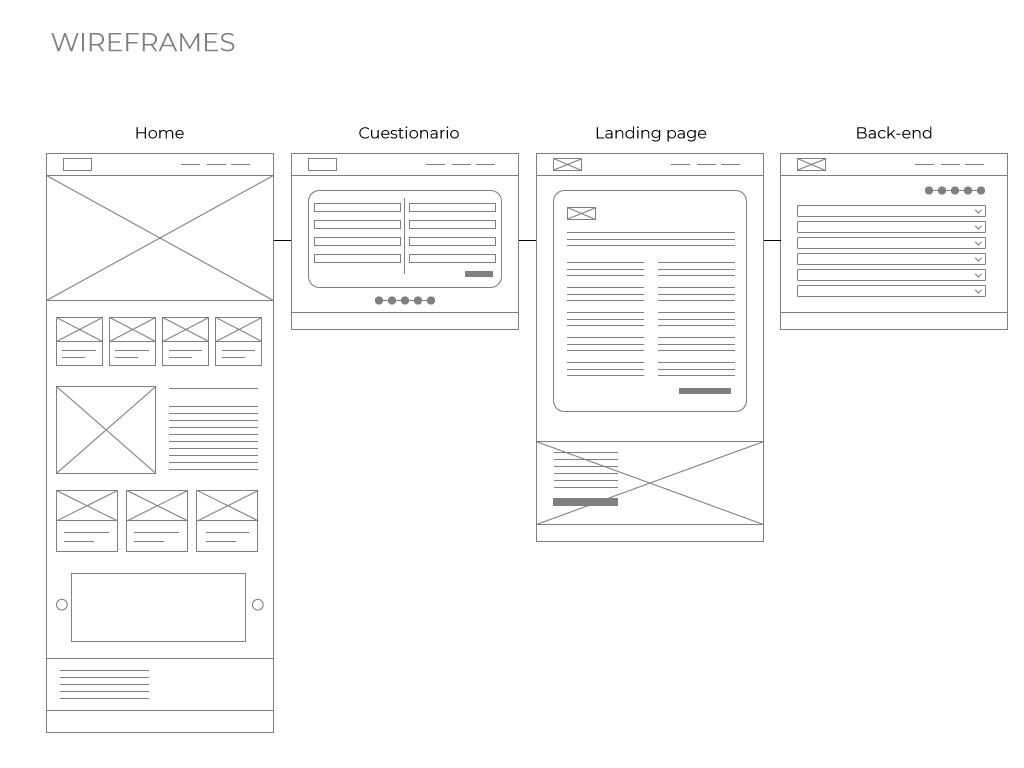
Flow 1: The user arrives at the main page and starts the demo, filling the basic data in 3 main steps:
• Choosing what type of service.
• Choose a name and corporate purpose.
• Fill a form of general information.
Ending with a pre-filled format that the user can save in their profile, receive in his email and/or create an account to save it in the user account section.

Flow 2: The user access the "new account section". Inside, the filling process continues using an accordion interface where each stage has a marker indicating the user progress filling the required fields.

Conclusion: I designed a UI where the main objective was to guide the user throughout the suscription process, indicating the progress in each of the screens, emphasizing security when entering sensitive data and a friendly user experience that works both for the needs of the client's marketing strategy and for the final user as well.
Role: UX/UI designer on Blueboy studio.
Main Goal: Design the user experience and interface of a digital catalog activated by a BLE device for flooring and tiles retail stores in Mexico. The product requires display location, search filters, product detail and product facing on each display. The app is for a tablet.
Target Audience: Architects, interior designers, construction executives and people interested in renovating their home.
Key Challenges: Integrate the user experience in the store and the digital catalog and his interactions with both the physical display and the application. It was also essential to design an intuitive application where the user understands its operation immediately.
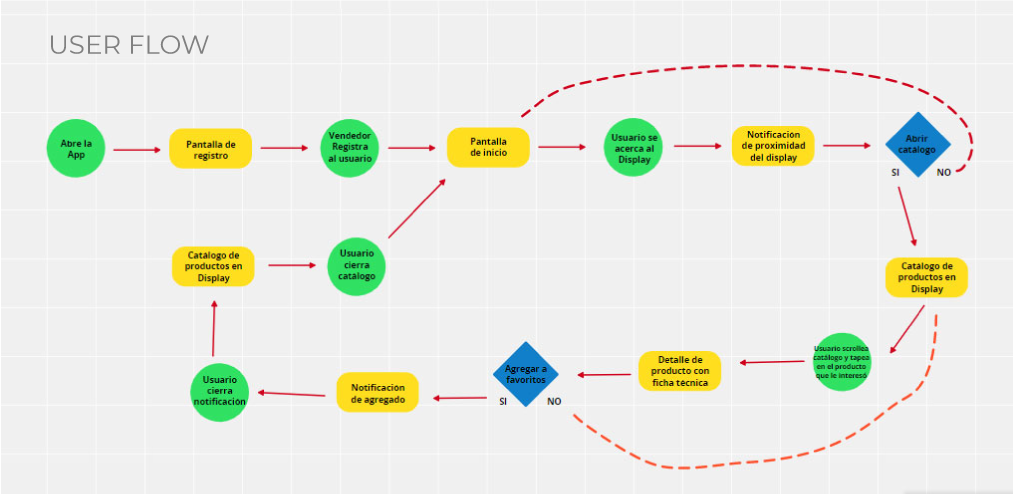
Once the user flow is defined, i sketched a Lo-Fi prototype using wireframes to integrate the user's requirements into the interface. I decided to use a 3 column structure where the navigation is visible at all times. To display the products, i choose 3D scroll cards to help the user explore the products on the display.
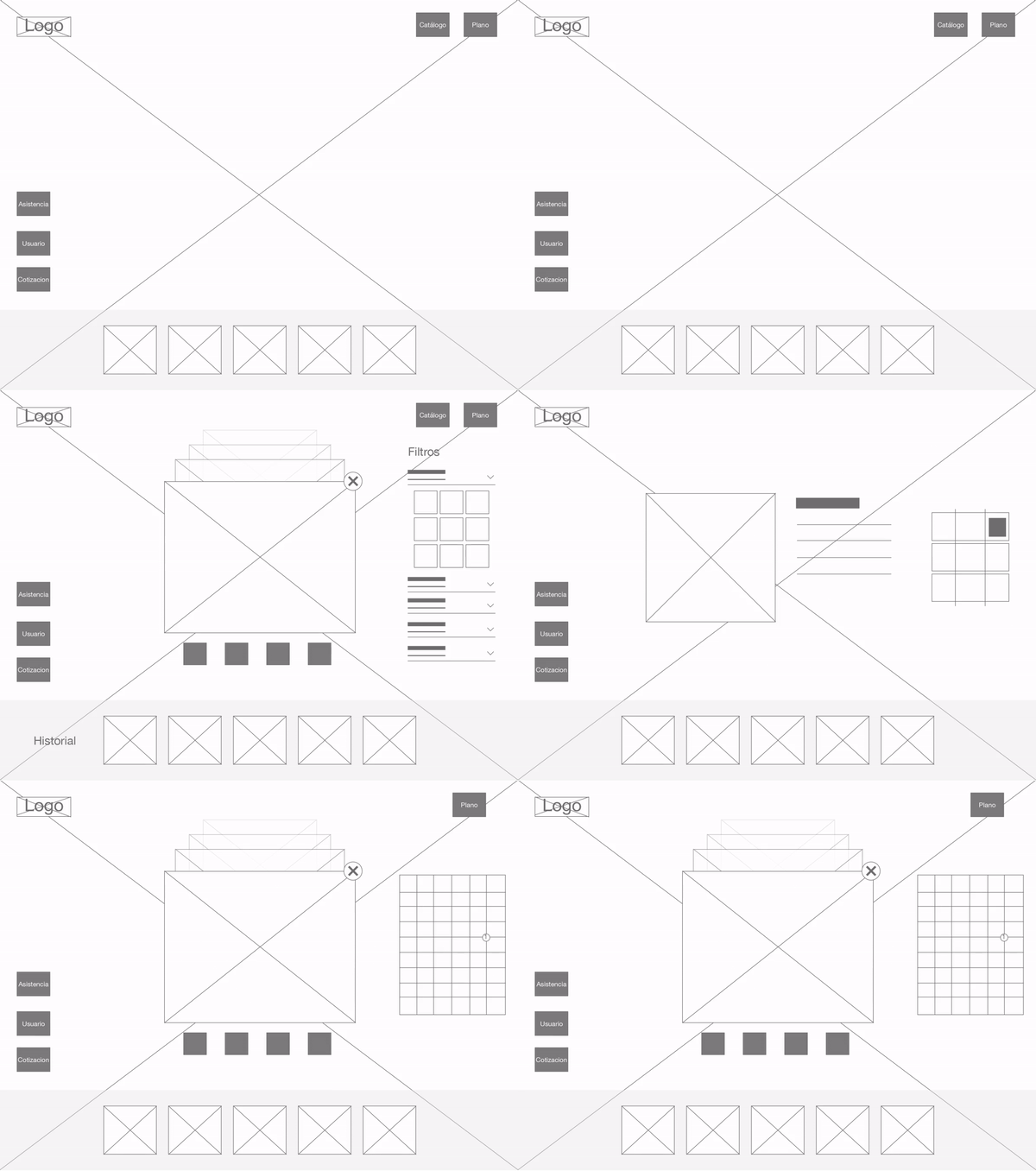
The user can access the product two ways. First, when in the proximity of a display that has a BLE device, the app is activated and exhibits the products in the application. The other way is searching specific products using filters and explore the digital catalog of the store. The product uses easy-to-understand iconography to help the user navigate the app intuitively. The app also show lifestyle photography renders applied to the product in the background and as a gallery.
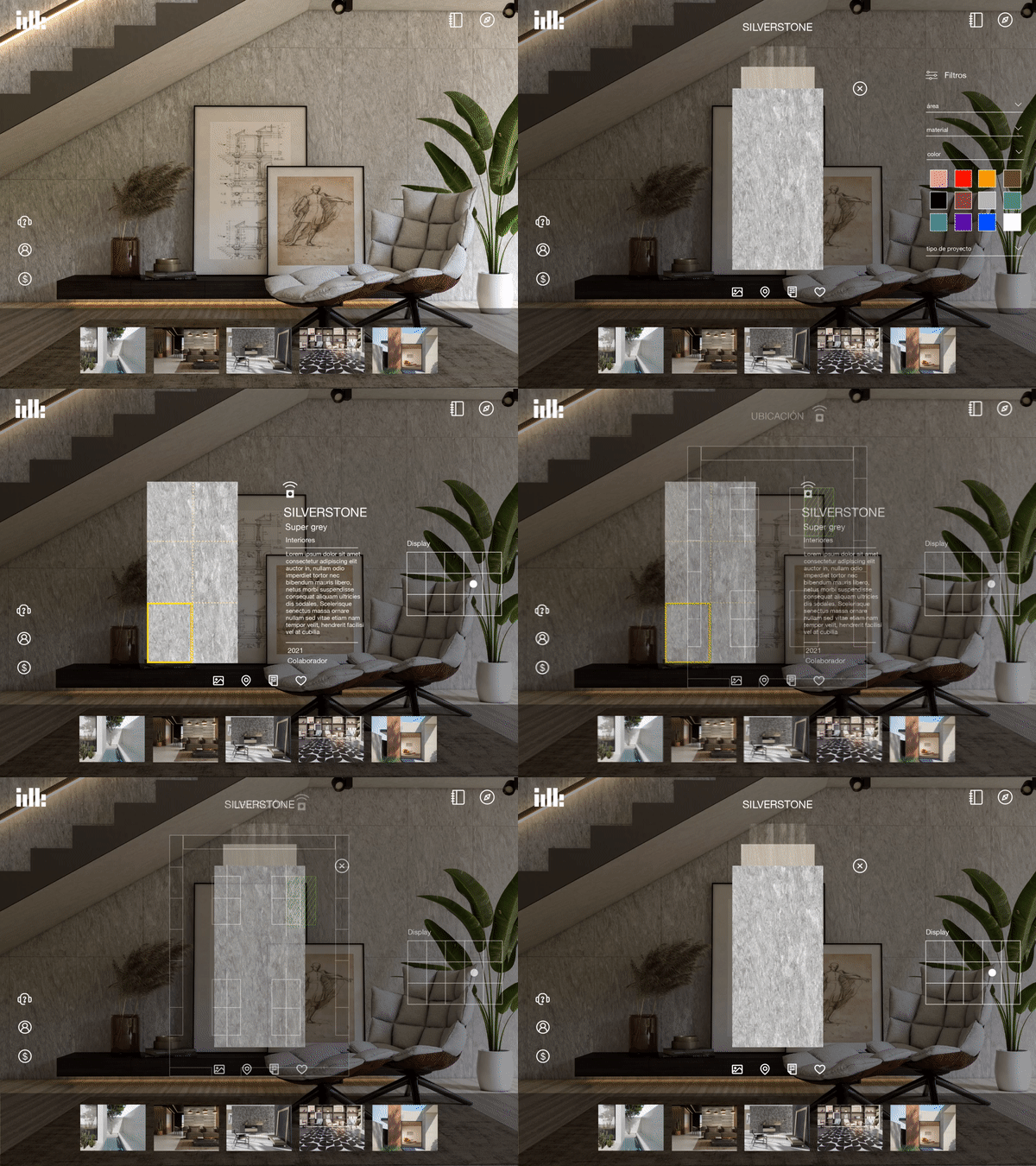
Conclusion: We designed a friendly and intuitive UI where the user can interact with the digital catalog and see the products on display allowing the user to record a log of their activity, save preferences, quotes and favorite products, wich is a helpful tool to the sales team.
Role: UX/UI designer
Main goal: Update the internal processes of the client's company from Excell spreadsheets to a fully functional digital product build on flutter. After several meetings with the client and analyzing their current processes, identifying the users and setting the goals, we are designing an integrated web and mobile application that will help them manage, schedule, and communicate different users trough the same app.
Target Audience: Employees from different departments.
Key Challenges: Understand the current process and provide a simpler tool that users can easily learn and use on their day to day activities.
I started identifying the different requirements and users needed, based on the company current process, later i compiled the data in a spreedsheet that i used as a guide for the developers to work on a database. Then, i graphed a basic sitemap of the structure for the app before starting to divide each requirement into user flows. We identified the priority of each flow with a color for scheduling our workload and deliver an MVP to test and present to the client.

Identifying User Flows
I worked on two main user flows depicting the steps users have to take to achieve their goals. I divided users in 3 categories:
• Sales
• Logisitcs
• Transporters
The Sales Department first takes the order from its customers, then logistics check the order and manage time, supplies and transportation needed and fill and print a form for the costumer to sign, then the transport operator check the tasks schedule for the day.


Transporter Operator APP
I started with a LoFi prototype for the transporter operator app, where the user can perform the following activities:
• Log in
• Select the vehicle
• Receive the schedule tasks for the day,
• Access a GPS Map of the location
• Review the items in the order needed to collect
• Take a picture of the printed document signed by the costumer.


Sales Department and logistics APP
I made a LoFi prototype for the web app intended for taking service orders, costumer administration and scheduling services. The app its going to be used by two main users, sales and logistics teams.
The main interface was a list based UI for services and clients that can be filtered with status depicting the current state of the service.
New data can be added and edited in a drawer type module.

Changes in the prototype
I tested the LoFi Prototype internally with the team and made some changes to the design, kept the drawer modules, but added individual interfaces for registering new costumers, adding locations and asociating materials to each costumer. Also a new interface was added for updating new stock materials.

Conclusion: I designed an easy to learn UI that employees in the company can use to perform their daily activities while maintaining their current work process.
Role: UX/UI designer
Main goal: I created an app to help college students to schedule tutoring sessions with teachers or senior students. With this app, students enter a mentorship program to help them improve their grades. This is a project i made for the Google UX Certificate Program.
Target Audience: College students and teachers.
Key Challenges: Creating an app that could be used in different screens.
I made a simple interface where students can find tutors and schedule sessions
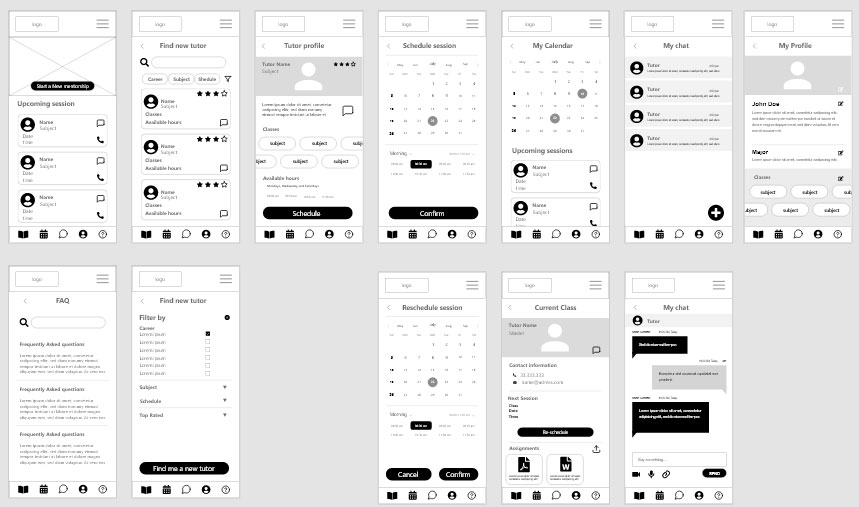
After conducting a usability test with some colleagues, iiterated some corrections based on the insights, specially about iconography and navigation. I used icons that are more recognizable for general users and eliminated screens that doesnt improve the user experience.
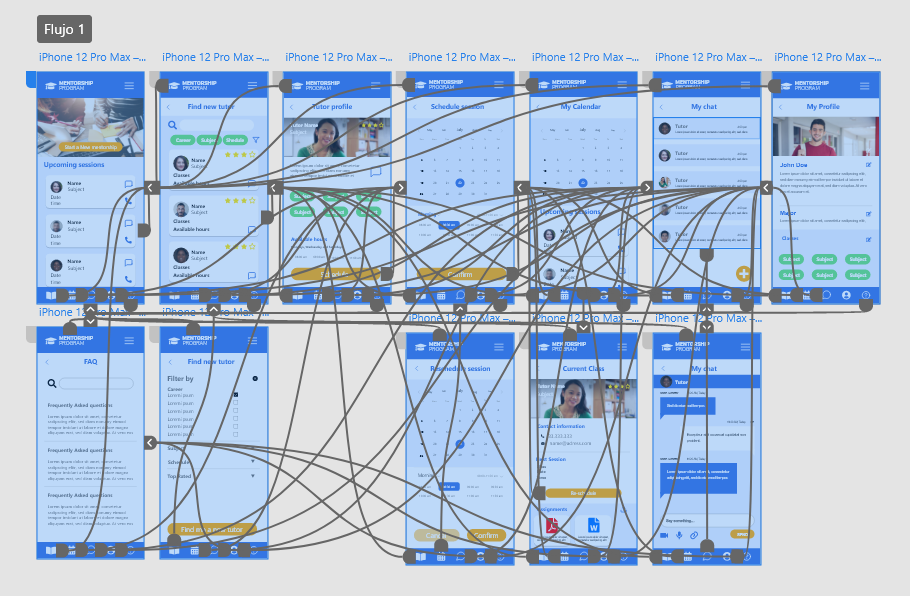
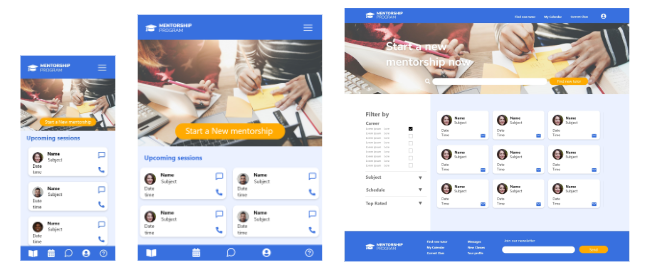
Conclusion: This was an important learning experience developing the product from the ground up using the framework learned in the Google UX Certificate Program.